Put readings and alerts where the floor can see them.
Alerts usually reach an office screen or a phone in a pocket. OctosX can show readings and alerts from Thermal Risk, Air & Environment and Equipment Health on indoor and outdoor LED displays, on the wall where people work.
The display in the photo, above the entrance to hall A, rotates through its three pages: North Plant, hall A; CO2 820 ppm; temperature 22 °C, relative humidity 41 %. Example values; limits are set per site.
What your team manages, and what the floor sees.
One screen lists every display on site: where it hangs, what it shows now, and which alerts can take it over.
Screens are configured per site during commissioning.
Seen on the floor
Shown where people work, not only where people check.
What goes on the board, and what happens when a line is crossed.
Readings rotate on a normal shift. When one crosses its limit, an alert page takes over: zone, reading, next step.
One floor board at the pump room door of North Plant, on a night shift. The board can draw on readings from three areas: panel temperature from Thermal Risk; CO₂, PM2.5, heat index level and gas readings (O₂, CO and H₂S) from Air & Environment; and pressure, flow, leak zones and vibration from Equipment Health. Before the leak, this board rotates its two pages: leak zones dry, in white, and CW-L1 pressure at 3.7 bar, low, in yellow: below the low limit of its band, an advisory that does not take the board over. At 02:47 the leak-detection cable in zone B of the pump room reports wet, and its trace crosses the wet limit. The alert goes to the dashboard, email and SMS, and to the floor board over a connection confirmed per project. The board switches to an alert page in red that reads ALERT, LEAK · ZONE B; its frame brightens and dims slowly three times, then stays lit. A second alert page names the pump room and the next step: call maintenance. The alert card shows the source, the zone, the reading and the time the alert went on the board. On-call acknowledges the alert at 02:51, and the alert page stays up. Zone B reports dry at 04:15: after a break in the time axis, its trace drops back to the dry line, the reading shows dry, and the alert page stays up until a person clears it; the alert card shows the alert as open, awaiting clear. Every step is time-stamped in the record. Example values; limits are set per site.
What would your board say?
Pick a preset scenario, the kind of board and how the text moves. The line under the board spells out what it shows.
Open the board simulator
Scenario
Board
Effect
Showing: LEAK DETECTED · PUMP ROOM ZONE B
- ALERT / LEAK · ZONE B
- ALERT · PUMP ROOM / WET FLOOR
- ALERT · NEXT STEP / CALL MAINTENANCE
Not explosion-proof. Gas detectors keep their own local alarms; the board can repeat a reading, not replace it.
Example values; limits and wording are set with your team for each site.
Why a board on the wall reaches people a phone doesn’t.
Noise, gloves, hearing protection and phones left in lockers all get in the way of a phone alert. A lit board in the line of sight needs none of them.
Inside the display · 3D
What the board is, where it goes, and how an alert reaches it.
- 00A generic floor board
A dot-matrix board OctosX supplies for the floor, seen from the outside: the face, the frame around it, the rear housing and the bracket.
- 01The dot-matrix face
Rows of LED dots inside a frame make large lit characters. Pages rotate, for example the site and zone, then a reading.
- 02Rear housing and cable entry
A closed housing at the back. Cables come in through an entry underneath.
- 03Mounting bracket
The bracket holds the board up where it can be read across the floor, here hung from a ceiling strut.
- 04An alert page
When an alert is set to show on this board, the rotation gives way to an alert page in the alert’s colour, always with the word ALERT. The border pulses three times, then stays steady.
- 00Indoors and outdoors
The same kind of board in two places: indoors on a bracket above a line entrance, outdoors on a pole in the yard.
- 01Indoor, above a line entrance
On a wall bracket above the way into a production line, tilted slightly toward the people walking in.
- 02Outdoor, on a pole
In a yard or at a gate, the board sits in a weather-resistant enclosure on a pole, with a sun hood over the face.
- 03Heat index on the yard board
The yard board can be set to show the heat index level. Here it shows Level 3 as an alert page in amber.
- 00A reading at a sensor point
A reading starts where a sensor is fitted: here a leak cable on the pump room floor reports zone B wet.
- 01Into OctosX
The reading reaches the OctosX platform, where limits set per site decide when it becomes an alert.
- 02Out to the board
The alert can also go on to a board. That link is drawn dashed because it is set up per project. Which readings, which alerts, and how each display connects are confirmed for each project.
- 03On the board
The board above the pump room door gives way to ALERT · LEAK ZONE B. The dashboard and the escalation path carry on as before.
The result · where the alert lands
Same alert, two places.
Two scenes side by side with the same alert, a leak in zone B. On the left, on a screen: the alert shows on an office screen and on a phone left in a locker, and the people working on the floor, wearing ear defenders, have nothing in view and stay unaware. On the right, on the floor: the same alert also goes on a board above the floor, which switches from its normal page to ALERT, LEAK ZONE B in red, and the people in the zone turn their heads to it.
The board adds a place to see an alert. It doesn’t replace the dashboard, the escalation path, or alarms your site is required to have.
Not a fire alarm, evacuation signal or gas alarm, and not a replacement for alarms your site is required to have. Gas detectors keep their own local alarms; the board can repeat a reading, not replace it. The board is not explosion-proof.
Four steps from a floor walk to a live board.
Pick the spot. Agree the words.
- Placement
- Line of sight, by zone
- Mount
- Wall, pole or ceiling, per site
- Connection
- Confirmed per project
- Messages
- Set with your team
- Go-live
- End-to-end test
Typical deployment. Each site is scoped individually.
Deployment runs in four steps: survey, mount, map, go live.
- Survey. A walk of the floor at North Plant marks the zones and the candidate spots for a board: inside hall A, at the line entrance and on a side wall; at the pump room door and inside the pump room; and in yard B, at the gate and at the far end. For each spot, the walk checks the line of sight from where people work and walk. Three spots are picked: the line entrance, the pump room door and the yard gate.
- Mount. A board is mounted at each chosen spot, on a wall, a pole or a ceiling, as the site allows. How each board connects to OctosX is confirmed per project.
- Map. For each board, your team agrees which readings and alerts it shows, the exact words on each page, the colour of each alert and who can change them. In the example, the pump room board shows ALERT · LEAK ZONE B in red when leak zone B reports wet, and the EHS lead can change the wording.
- Live. An end-to-end test alert is sent. The pump room board switches to the alert page, and the alert goes to on-call and the supervisor and, where a floor display is part of the project, to the floor board as one more step.
A display plan you can hand to someone.
Where each board hangs, what it shows on a normal shift, which alerts take it over, and the exact words. Switch between an active alert and a normal shift to see how the plan reads.
Open the sample display plan
Alert in progress
North Plant · Floor displays
- Shift
- Night · as of 02:52
- Boards
- 5
- Pages in rotation
- 13
- Alert takeovers this shift
- 1
- Data
- 4 of 5 boards responding
A board repeats readings and alerts; it does not measure anything itself. It is not a fire alarm, evacuation signal or gas alarm, and not a replacement for alarms your site is required to have. Gas detectors keep their own local alarms. Not explosion-proof. A board that stops responding is shown as offline, not as normal.
Plan status — 1 takeover in progress, 1 board offline
The leak cable in zone B reported wet at 02:47. As the plan sets out, the board at the pump room door left its rotation and switched to the alert page, in red, the colour agreed for critical alerts. On-call acknowledged the alert at 02:51. In this plan, the alert page stays up until zone B reports dry and the alert is cleared.
- On the board nowALERT · LEAK ZONE B
The canteen board stopped responding at 01:58 and is shown as offline on the Floor Displays screen, not as normal. Its plan adds critical alerts from any zone, so the leak zone B alert at 02:47 did not appear there. The alert still reached on-call and the pump room board.
Yesterday afternoon the heat index in Yard B reached Level 3 at 13:40. The gate board left its rotation and showed the Level 3 page in amber, the colour agreed for warnings, until the level dropped at 15:20, then went back to its rotation. The yard supervisor acknowledged the alert at 13:44.
- Shown 13:40–15:20ALERT · HEAT INDEX L3
Every item shows the exact words on the board, when they changed and who acknowledged the alert.
Normal shift
North Plant · Floor displays
- Shift
- Day · typical
- Boards
- 5
- Pages in rotation
- 13
- Alert takeovers this shift
- 0
- Data
- 5 of 5 boards responding
A board repeats readings and alerts; it does not measure anything itself. It is not a fire alarm, evacuation signal or gas alarm, and not a replacement for alarms your site is required to have. Gas detectors keep their own local alarms. Not explosion-proof.
Rotation — 5 boards, 13 pages, no takeovers
Indoor board above the line entrance, read by crews on the line and by anyone walking in. Each page holds for a few seconds, in this order, in white. Critical and warning alerts for hall A take the board over.
- Page 1NORTH PLANT · HALL A
- Page 2CO2 820 PPM
- Page 3TEMP 22 °C · RH 41 %
Outdoor board on a pole at the yard gate, facing crews and drivers coming in. Heat index Level 3 and above takes the board over with its own page; Levels 1 and 2 stay in the rotation.
- Page 1HEAT INDEX L1
- Page 2TEMP 24 °C · RH 48 %
- Page 3WIND 18 KM/H
Indoor board beside the pump room door, read before anyone goes in. A wet leak zone comes first, then a pressure alert on the CW-L1 loop, then the rotation.
- Page 1LEAK ZONES DRY
- Page 2CW-L1 4.2 BAR
Repeats the readings of the fixed gas detector at the tank entry. The detector keeps its own local alarm; the board adds a second place to see it and does not replace that alarm, portable gas monitors or your confined-space entry procedure. Not explosion-proof.
- Page 1TANK T-3 · O2 20.9 %
- Page 2CO 0 PPM · H2S 0 PPM
Indoor board on the canteen wall, read on breaks and at shift change. Critical alerts from any zone take it over, so a crew on a break can see one too.
- Page 1NORTH PLANT
- Page 2YARD B · HEAT INDEX L1
- Page 3OUTSIDE 24 °C
Every item shows where the board hangs, the exact words in order, what takes it over and who owns it.
For the people who answer for the floor.
-
Line leads & supervisors
Know without looking for it.
When a reading crosses its limit, the board above the line switches to an alert page, which adds a place to see the alert for people wearing ear defenders who are not looking at a phone or a screen. The animation shows three people at a running line; the board above them changes from a normal page, Hall A, CO2 820 ppm, in white, to an alert page, Alert, panel temperature, in red. Its frame pulses three times and then stays on, and the three people look up at it. Example values; limits are set per site.
-
EHS & safety
One alert, on the screen and on the wall.
One alert can be shown on the OctosX dashboard and on a board on the wall, and the record keeps when it was acknowledged. The animation shows a dashboard screen and a floor board lighting up together: Alert, heat index Level 3, Yard B, from 13:40, in amber. The record adds the alert at 13:40, then a second row, acknowledged at 13:44, which is ticked. How each display connects is confirmed per project. Example values; limits are set per site.
-
Maintenance & facilities
Walk to the right zone.
The board names the zone, so maintenance and facilities can walk straight to the right place. The animation shows a floor plan with four zones off one corridor; the board changes from a normal page, Pump room, leak zones dry, to Alert, leak zone B, in red. Zone B is marked and a path is drawn from the person at the door to zone B. People handle the follow-up; nothing is switched off automatically. Example values; limits are set per site.
Where floor displays fit.
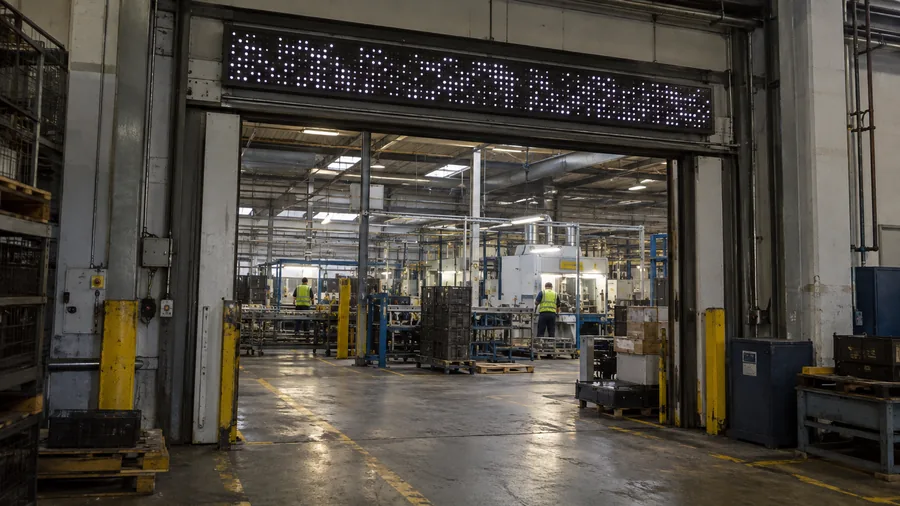
- Panel temperature
- CO₂
- PM2.5
Production hall entrances
Panel temperature and air readings in rotation, where the shift walks in. When a reading crosses the line set for it, an alert page takes over the board.
Example board line: Hall A, CO₂ 820 ppm. Example values; limits are set per site.
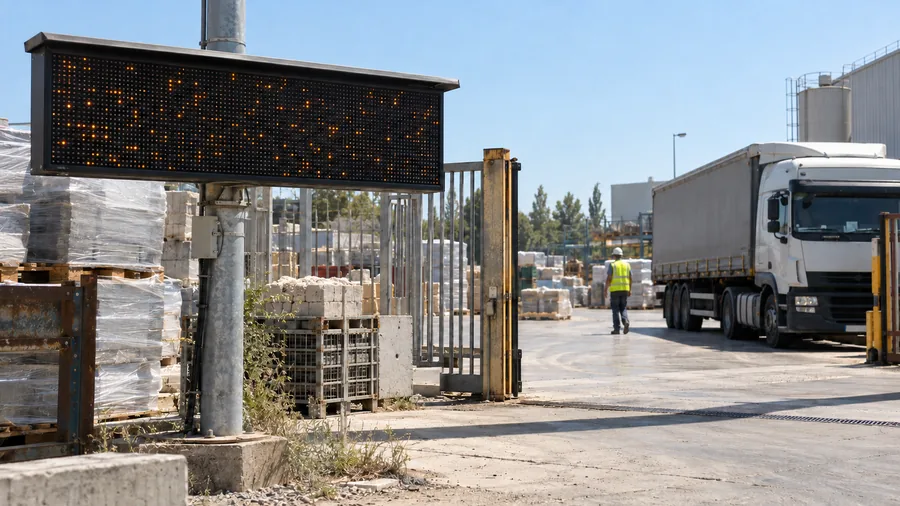
- Heat index level
- Wind
- Rain
Yards, docks and site gates
Heat index level, wind and rain, outside where there is no screen. When the level changes, the new level takes over the board.
Example board line: heat index Level 3, in amber. Example values; limits are set per site.
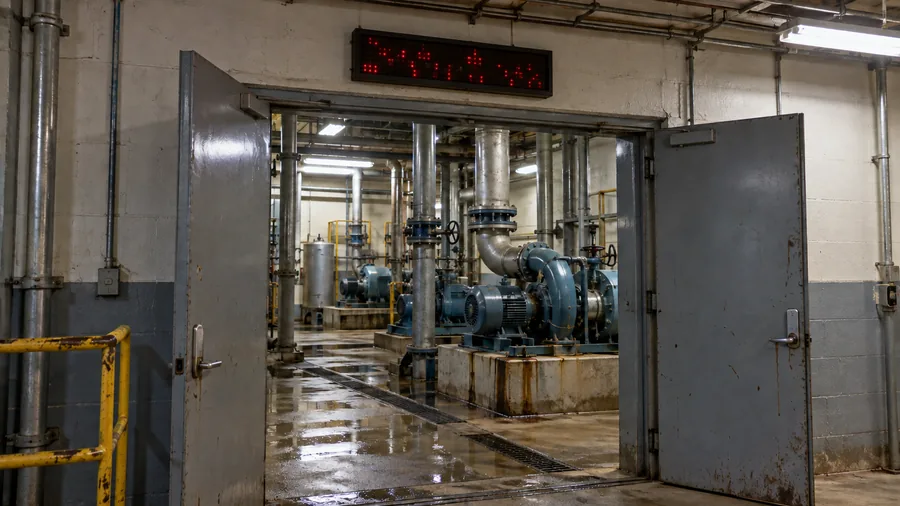
- Leak zones
- Pressure
- Flow
Pump and utility rooms
Leak, pressure and flow for rooms no one stands in. The alert shows at the door before anyone walks in.
Example board line: Alert, leak zone B, in red. Example values; limits are set per site.
Confined-space entry. Gas readings shown at the entry point, alongside the detector's own alarm. Not explosion-proof; not for hazardous (classified) locations; does not replace portable gas monitors or your confined-space entry procedure.
Air & Environment →Put your alerts where people work.
Tell us which zones worry you and what people there need to see. We'll reply with where boards would go, what they would show and how they would connect at your site.